


VPN PotatoVPN - WiFi Proxy
4.53.36K Reviews
App Specs
- Version
- 64.0.1
- Updated On
- License
- Free
- Downloads
- 10,000,000+
- Developer
- FREE VPN POTATO PTE. LTD.
- Categories
- Tools
- Platform
- Android
Screenshots
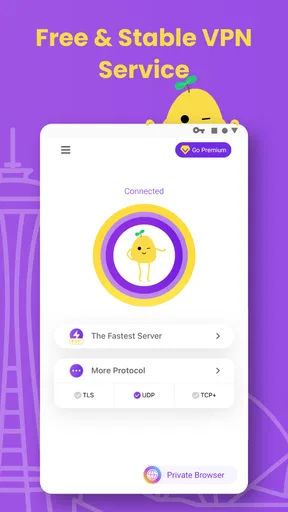
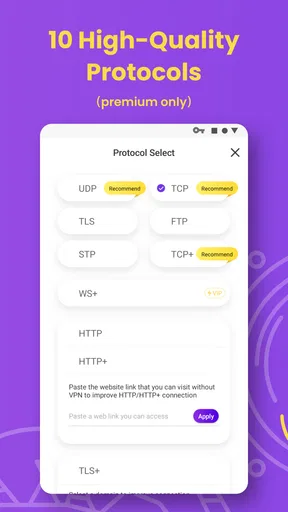
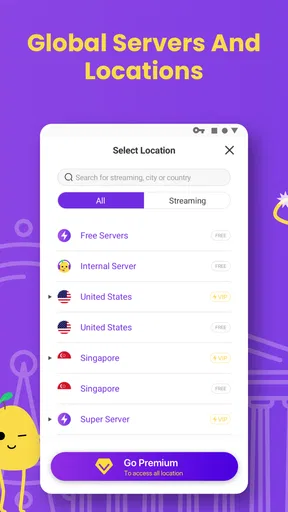
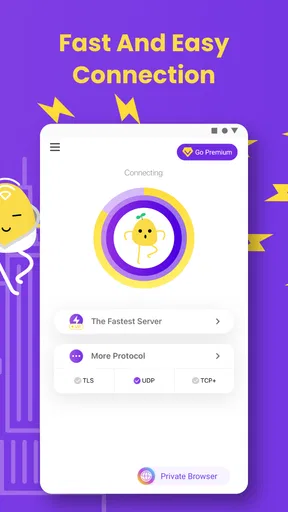

 Analysis by AppCompare
I start judging a VPN by the moment I need it: I’m on a public network, have a few minutes, and don’t want to wrestle with settings before opening an app. That practical test matters more to me than a long feature list. PotatoVPN - WiFi Proxy is aimed at people who want a simple way to route a phone’s connection through a VPN, especially when using WiFi away from home. Its appeal is convenience, but a VPN is also a privacy tool, so I would treat ease of use as one part of the decision, not the whole decision.
What I would check before connecting
Before relying on any VPN, I think about what I’m trying to protect and what I need the connection to do. A VPN can help shield traffic on a network you don’t control, but it does not make every online action anonymous or replace careful account security. I still avoid entering sensitive details on suspicious pages, use strong account protections, and check that a site is legitimate. That distinction is useful here: PotatoVPN can be a convenient layer for browsing on public WiFi, not a reason to stop using common sense.
I’d also consider whether I need a VPN occasionally or expect it to stay on throughout the day. Someone who wants a quick connection before checking messages at a café has a different priority from a person who needs a carefully controlled setup for work. If you handle confidential work material, I’d first follow your employer’s security guidance rather than choosing a consumer VPN on convenience alone.
Who is most likely to enjoy it
The app makes the most sense for a phone user who values a straightforward connection flow and doesn’t want to learn networking terms just to use a VPN. It is listed in the Tools category, is free to install, and comes from FREE VPN POTATO PTE. LTD. Its Teen content rating makes it relevant to younger users as well as adults, though I’d still encourage families to talk about privacy and safe browsing rather than treating a VPN as a complete safety system.
PotatoVPN has a 4.5 average from around 199,000 ratings and more than 10 million installs, which suggests that many people have tried it. Those figures can help show that it is established, but they don’t tell me whether a particular server will suit my location or whether an individual user will like the experience. I would use the app myself for ordinary, short sessions, then judge it on how consistently it behaves on the networks I actually use.
A realistic day-to-day test
Picture me arriving at a busy café and joining its WiFi to look up a train change, check a map, and reply to a couple of messages. I’d open the VPN, connect before doing that browsing, and leave it on while I finish. If pages feel slow or a service refuses to load, I’d disconnect briefly only when the task genuinely requires it, then reconnect afterward. That small habit is more practical than assuming a VPN never affects how an app or website behaves.
For a better first impression, I’d try it on both WiFi and mobile data at a time when I’m not in a rush. That lets me notice whether connecting is simple, whether the apps I rely on still work, and whether performance feels acceptable before I need it in public. I’d also avoid testing a new VPN for the first time while making a time-critical payment or joining an important work call.
Worth Reading Before You Choose

Flipboard Shows What News Apps Must Do Beyond the Feed

Switching to Android Auto Means Rethinking Your Driving Routine

Google Calendar Makes a Crowded Week Easier to Manage

Ludo King Makes the Most of the Minutes Between Plans

Baby Panda World Brings Quick Play to Modern Phones, but Its Game Library Feels Busy

ESPN’s Live Game View Makes Following Close Games Easier
How it fits among VPN choices
PotatoVPN’s strongest case is a low-friction way to add a VPN connection to everyday phone use. The Android app is listed as version 64.0.1 and requires Android 6.0 or later. The app is also available on iOS. The store describes the app as free, with in-app purchases ranging from $11.99 to $74.99 per item, so I’d check the purchase screen carefully before starting anything paid and decide whether the free experience already meets my needs.
Where a simple VPN has an edge
Compared with manually configuring a VPN connection or choosing a tool aimed at advanced network control, a simple app can reduce setup friction. That is a real advantage when the goal is just to add a layer of protection before ordinary browsing on shared WiFi. PotatoVPN’s short name and direct purpose make it easy to remember when I’m about to join a network in a hotel lobby, waiting room, or café.
There is a trade-off: fewer decisions at the start can mean less control for people who want to inspect and tune every connection detail. I would not choose a simple phone VPN as a substitute for a managed work setup, or as my only answer to a complex privacy threat. If those are my needs, I’d compare services based on the controls and independent assurances I require, rather than picking whichever app connects with the fewest taps.
When another approach may be better
If I only want to avoid an unfamiliar public hotspot, using mobile data instead may be the simpler choice when my plan and signal allow it. If I need an always-on, highly controlled setup across several devices, I’d look for a service whose documented options match that requirement. And if my main concern is protecting files or accounts, I’d focus on device updates, account security, and trusted storage as well; a VPN does not secure those by itself.
Changing VPNs can also take more effort than installing another app. I would need to test the replacement on the networks I use, check whether important services behave normally, and review any purchase choice before committing. Keeping the old setup available until the new one passes those everyday checks avoids being left without a workable option when I’m away from home.
What I’d keep in mind about privacy
The safest way to assess a VPN is to read its current privacy information and understand what the provider says it collects and how it handles that information. I would not treat a brief app description or a reassuring slogan as a substitute for that check. A VPN provider becomes part of the route your traffic takes, so choosing one involves trust as well as convenience. This is especially worth considering if I plan to use it for more than casual browsing.
I’d also keep expectations grounded when using a VPN for location-based content. A different connection location may change what a service displays, but it does not guarantee access, and some services may limit or block VPN traffic. If a site stops working, I’d first try a different connection or use the service normally rather than repeatedly switching locations and assuming the VPN is broken.
Cost, compatibility, and the switch
Because PotatoVPN is free to install but includes paid in-app options, I’d separate “can I try it?” from “do I want to pay for it?” The current version is 64.0.1, and Android support starts at version 6.0. I’d check that my device can run it, try a normal browsing session, and review the purchase terms on screen before deciding whether an upgrade makes sense. A free starting point lowers the barrier, but it doesn’t make a paid choice automatic.
For someone moving from another VPN, I’d make the change deliberately: note which everyday apps need to work, test those first, and avoid cancelling an existing arrangement until the new one has proved dependable for my routine. For a first-time user, the reverse applies: begin with simple, non-sensitive browsing, learn how connecting and disconnecting affects the phone, and only then decide whether to use it regularly.
My recommendation
I’d recommend PotatoVPN to someone who wants an approachable VPN app for occasional public WiFi use and is comfortable checking the privacy and purchase details before relying on it. Its free entry point, broad adoption, and Tools focus make it an easy option to consider, while its Teen rating is a reminder that younger users may encounter it too. The developer is FREE VPN POTATO PTE. LTD., and the app was released on July 4, 2019; I’d still base my decision on how it performs for my current needs, not just its history or popularity.
I’d skip it if I needed documented, fine-grained controls for professional use, wanted to avoid trusting a third-party VPN provider, or had no reason to route traffic through a VPN in the first place. In those cases, mobile data, a work-approved solution, or a more carefully evaluated privacy service may fit better. For everyday use, I’d start with a low-stakes session, see whether the connection suits my phone and habits, and keep the app only if that hands-on test earns its place.
First impressions
Ever find yourself in a coffee shop, sipping on a latte, and suddenly realizing your WiFi connection is sketchier than a spy thriller? That’s when you need a trusty VPN by your side. Enter PotatoVPN - WiFi Proxy, an app that’s as comforting as your favorite couch potato day, but way more secure.
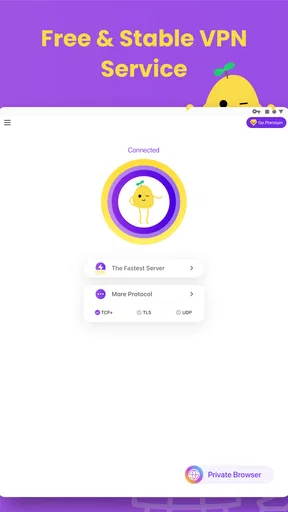
Downloading PotatoVPN is as straightforward as ordering fries at a drive-thru. The interface is clean, inviting, and super user-friendly. You’re greeted with a simple "Connect" button, eliminating any unnecessary tech jargon that could scare off the less tech-savvy among us. It’s like having a big, friendly potato holding your hand through the process.
Features That Make It Special
Once you dive into the app, you’ll quickly notice the array of features designed to keep your online presence safe. The app offers a robust WiFi Proxy service that encrypts your internet traffic, making it a fortress against prying eyes. Whether you’re working remotely or streaming your favorite show from a questionable website, this feature is a lifesaver.
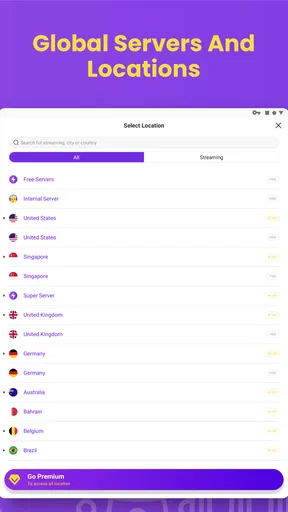
Switching between servers is a breeze with PotatoVPN. It offers a variety of locations, so you can mask your IP address and surf the web as if you were lounging in a different country. This can be particularly handy if you’re trying to access content that’s geo-restricted. Imagine being in Paris, virtually, without leaving your couch!
Performance and Speed
One of the biggest gripes with VPNs can be speed, but this app doesn’t disappoint. I tested it during peak hours, and it held up remarkably well. Streaming, browsing, and downloading were as smooth as butter. It’s like having a secret tunnel through the internet, bypassing all the traffic jams.
Privacy and Security
Let’s talk about the elephant in the room: privacy. In a world where data breaches feel as common as bad weather, PotatoVPN’s no-logs policy is reassuring. They don’t store your data, meaning even if someone tried to pry, there’d be nothing to find. It’s as if you’re surfing in incognito mode, but with the added protection of a digital moat.
Ease of Use
If you’re not a tech wizard, fear not. This app is designed for everyone, from tech rookies to seasoned pros. The setup process is straightforward, and the app holds your hand through every step. It’s like your tech-savvy best friend, guiding you through the murky waters of digital security.
Customer Support
Sometimes, things go awry. Maybe your connection drops, or you have a question about server locations. The support team behind this app is responsive and helpful, making sure your experience is as seamless as possible. It’s like having a tech support potato on speed dial.
Final Thoughts
So, is PotatoVPN - WiFi Proxy worth a spot on your phone? Absolutely. It’s reliable, fast, and incredibly easy to use. Whether you need it for work, play, or just peace of mind, this app delivers. It’s like having an invisible shield around your online activities, ensuring you can surf, stream, and download with confidence.
In a nutshell, if you’re looking for a VPN that won’t add to your digital stress, PotatoVPN is a solid choice. So go ahead, download it, and surf with the confidence of a potato in a cozy sofa. You’ve got the power of anonymity in your pocket, and that’s a pretty sweet deal.
Pros
- User-friendly interface for easy navigation.
- Fast connection speeds for quick browsing.
- Supports multiple devices simultaneously.
- No-log policy ensures privacy protection.
- Wide range of global server locations.
Cons
- Free version has limited features.
- Occasional connection drops.
- Ads in the free version can be intrusive.
- Lacks advanced configuration options.
- Higher cost for premium features.
FAQs for VPN PotatoVPN - WiFi Proxy
What platforms is PotatoVPN available on?
PotatoVPN is available for both Android and iOS devices. Users can download it from the Google Play Store or the Apple App Store. This ensures that you can protect your privacy and secure your internet connection on a wide range of smartphones and tablets, regardless of the operating system.
Does PotatoVPN offer a free version?
Yes, PotatoVPN offers a free version that allows users to access basic features. This is ideal for those who want to test the app before committing to a subscription. However, the free version might have some limitations in terms of server locations and connection speed compared to the premium version.
How does PotatoVPN ensure user privacy and security?
PotatoVPN uses high-level encryption to secure your internet connection, ensuring that your data remains private. It masks your IP address, making your online activities anonymous. Additionally, the app does not log your browsing history, ensuring that your data is not stored or shared with third parties.
Can PotatoVPN bypass geo-restrictions on streaming platforms?
Yes, PotatoVPN is designed to help users bypass geo-restrictions, allowing access to content on various streaming platforms. By connecting to servers in different regions, users can access a broader range of content. However, performance may vary depending on server congestion and specific platform restrictions.
What are the subscription options for PotatoVPN?
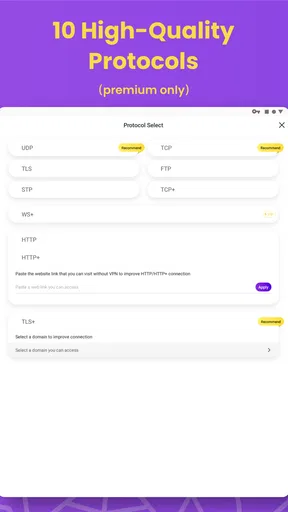
PotatoVPN offers several subscription plans, including monthly, quarterly, and yearly options. Each plan provides access to premium features like faster speeds, more server locations, and priority customer support. The yearly plan typically offers the best value for those who plan to use the service long-term.


